Blog

  • Building A World Around Passwords

    Building A World Around Passwords

    Photo by CMDR Shane on Unsplash

    Microsoft has massive plans to let user access its services without having the need to use passwords. In the latest preview build of Windows 10 they have taken giant step towards doing so. As internet user and usage grows year on year, many companies are following the similar approach.

    After being an internet/system user for last two decades, I believe it’s nearly impossible to access systems without passwords. I will be super surprised if password less systems can be created for mass usage. More than creating password less systems, what is required is how to make systems more secured by creating easy to use tools around passwords that add second layer of authentication. It is also important to ensure that such additional authentication system don’t end up being too complex to use, otherwise user adoption will be slow.

    Based on personal tech usage experience, if multi-authentication mode of accessing system is complex like asking codes every time a user logs in, not getting the code due to network issue or locking user out completely for sure will not attract faster adoption. Troy Hunt has written an article on how second authentication mode should evolve around passwords. I do agree with most of his points, but it seems for now only big tech giants like Microsoft, Google, Apple, Amazon etc are able to implement such solutions for its users. It’s very critical to bring such solution across all the services irrespective of the size of business. This will also ensure faster adoption of multi-authentication mode.

    I am in strong favor of TPM that is embedded in the hardware. Companies need to find a way to store keys in these TPMs, which will ensure that user is able to access systems/services only from set of registered devices having TPMs. This may invite trouble but I think it will be more robust than software tokens and way better than asking users to use another hardware than can get easily lost.

  • Who Is Winning Facial Recognition Tech?

    Who Is Winning Facial Recognition Tech?

    Photo by Warren Wong on Unsplash

    The answer to above question is straight forward, it’s China. In this article, I want to summarize how China is doing by separating it into three categories: The Good, The Bad and The Ugly.

    The Good:

    China uses the facial recognition tech to provide citizen with services. For example, if you are running a marathon and need your pictures to be clicked, then you simply sign up for services that will facially recognize you and send all your digital copies at the end of marathon. This is very simple and at the same time very complex service where China scores. I have to say China scores instead of a specific tech company, as most of the big giants in China do have government backing, without which they can’t provide many services that requires digital tapping.

    Another example is easy access in and out of parking lot.

    The Bad:

    Social Credit System is reputation based system being developed in China to replace the Credit Reporting System to rate its citizens. Using this information, government can literally blacklist people from specific government services like driving license based on how you are driving!. This not only requires tapping into every aspect of citizen’s daily activity but also to bring together surveillance based data that usually will require facial recognition.

    This way China is able to bring two systems together to create very robust surveillance infrastructure. Such services are neither good nor ugly, but bad to those who aren’t going to be liability. This is exactly what even an episode of Black Mirror showed.

    The Ugly:

    The ugliest usage of facial tech in China is 24×7 surveillance. Whether you are a citizen or just a tourist in China, you are being watched 24×7, tracked and followed by cameras everywhere to ensure you aren’t a threat. Though it makes sense to do this in order to provide a safe environment, however the major issue with this is that privacy is no where to be found. Everything you do is being logged. Add all the digital traces in form of digital payments, internet activity etc, and you get a near perfect Total Information Awareness.

    On one hand China wants to provide services using facial tech and on other hand it also wants to tap into everyone’s daily activity? What do you think about this? I think India is also heading towards similar system.

  • Smart Speakers With Smart Processors

    Smart Speakers With Smart Processors

    Photo by Paul Esch-Laurent on Unsplash

    Hardware plays crucial role in product success as much as software does. Smart speakers are getting lot of traction and every big tech giant with smart assistant is fighting to get hold of this market share. Part of the reason is to get the services delivered using a different medium, however major goal is to get hold of the data that can be used to make algorithms better to provide much personalized services.

    Amazon Echo was one of the first devices to bring smart speaker solution. It kick started race and Big-5 (Apple, Amazon, Google, Microsoft and Samsung) started gearing up to get similar solution out. Amazon never had success in smartphone business, but it got good traction in smart speaker domain due to seamless connectivity to the e-commerce, video and music database it created over two decades. On other hand, other four of the Big-5 have strong hold on smartphone domain and they rely on it as a device that provides smart assistive services. Due to the potential business opportunity, rest of the Big-5 have also launched (some in process) similar hardware solution. Hence, I decided to take a quick look at what type of processors each of the devices from Big-5 is using with help from iFixit.

    Echo By Amazon

    Amazon Echo uses Texas Instrument’s DM3725CUS100 Digital Media Processor (marked in red), which provides a reliable low power ARM processor solution. It is a single core which I think is good enough for such domain specific device. Also many of the functionality used by Echo is voice based so it also helps to have a DSP.

    (Image by iFixit)

    Home By Google

    Google Home comes with Marvell 88DE3006 Armada 1500 Mini Plus (marked in red), which is a dual core ARM. As per iFixit it’s similar processor used in Google’s Chromecast device. This make sense as it is cheaper to port similar solution in another form factor as long as it does provides the solution required.

    (Image by iFixit)

    HomePod by Apple

    Apple recently announced HomePod smart speaker. As is the case with every Apple device this, it uses home designed solution Apple A8 APL1011 SoC. Similar to Google it’s re-used from other smart devices from Apple.

    (Image by iFixit)

    Harman Kardon INVOKE by Microsoft

    Microsoft hasn’t designed the hardware for INVOKE smart speaker by Harman Kardon, but they have powered it up using the Cortana virtual assistant. iFixit hasn’t done a tear down on it, so I will skip details on this device. I expect it to run ARM only, what else?

    Galaxy Home By Samsung

    The last on the list is Galaxy Home. It’s not out in the market yet, but Samsung has announced Exynos processors for smart speakers which they are hoping will not only be used by them but also by other companies in smart speaker domain.

    Conclusion

    At the end the form factor changes, but the processors inside them remains similar to smartphones. It will be good to see how the hardware aspect of smart speakers change as newer versions of new products mainly HomePod, INVOKE and Galaxy Home are launched.

    Samsung and Apple do have an advantage as they can use in house hardware design capabilities to make system more efficient and reliable. On other hand Google, Microsoft and Amazon have advantage on software side due to the huge data they have. It will all come doing to who uses the best of both software and hardware world for such a domain specific device.

    I am also expecting all the music hardware giants like Bose, JBL and Plantronics to follow smart speaker/device trend which eventually plays in hands of processor companies like TI, Marvell and Samsung.

  • Top Semiconductor Resources

    Photo by Alexandre Debiève on Unsplash

    If you are looking to keep track of semiconductor industry then here I am listing few resources that provide good insight into this industry.

    Top Semiconductor Resources:

    • The Linley Group:
      • Linley Group is the best resource to get 360 degree view of semiconductor industry. They publish semiconductor focused reports that cover range of products and domains. The only (big) caveat is that the reports they publish are too costly. So, unless your institute or employer provides access to you it will be very difficult to access it. But there are few resources that are open to all and can really help you gain insight into different semiconductor domains.
    • ChipDesign Mag:
      • Articles from ChipDesign Mag (CDM) are very technical written by leading domain experts. It really helps in understanding all products that are out in market and how they are enabling change. They are also part of some of leading technical conference that helps connect industry and academia. One thing I don’t like about this resource is the website design.
    • Solid State Technology:
      • If you want to learn about manufacturing aspect of the semiconductor then Solid State Technology (SST) is one of the best resource. They also back yearly The ConFab which connects industry experts in manufacturing. Manufacturing is costly and very important part of semiconductor and this is where SST can help you.
    • Semiconductor Manufacturing & Design:
      • SMD is part of SST but focuses more on technical aspect of manufacturing rather than how to of manufacturing. This will provide you good understanding about how design meets manufacturing.
    • Tech Design Forum:
      • Tech Design Forum (TDF) is very different from all above resources. They publish technically very accurate articles. You won’t find them on social media or any other places, but if you read the articles they have on Electronic System Design and Manufacturing (ESDM) then you will realize how good this particular resource is.

    Summary:

    If you want to learn about semiconductor manufacturing go with SST. Later, if you want to understand technology behind manufacturing of these products then read SMD. To gain insight into semiconductor products check CDM. For anything ESDM, TDF is best. Lastly, if you are from management side and into semiconductor go for The Linley Group.

  • Exploration of Memory and Cluster Modes in Directory-Based Many-Core CMPs.


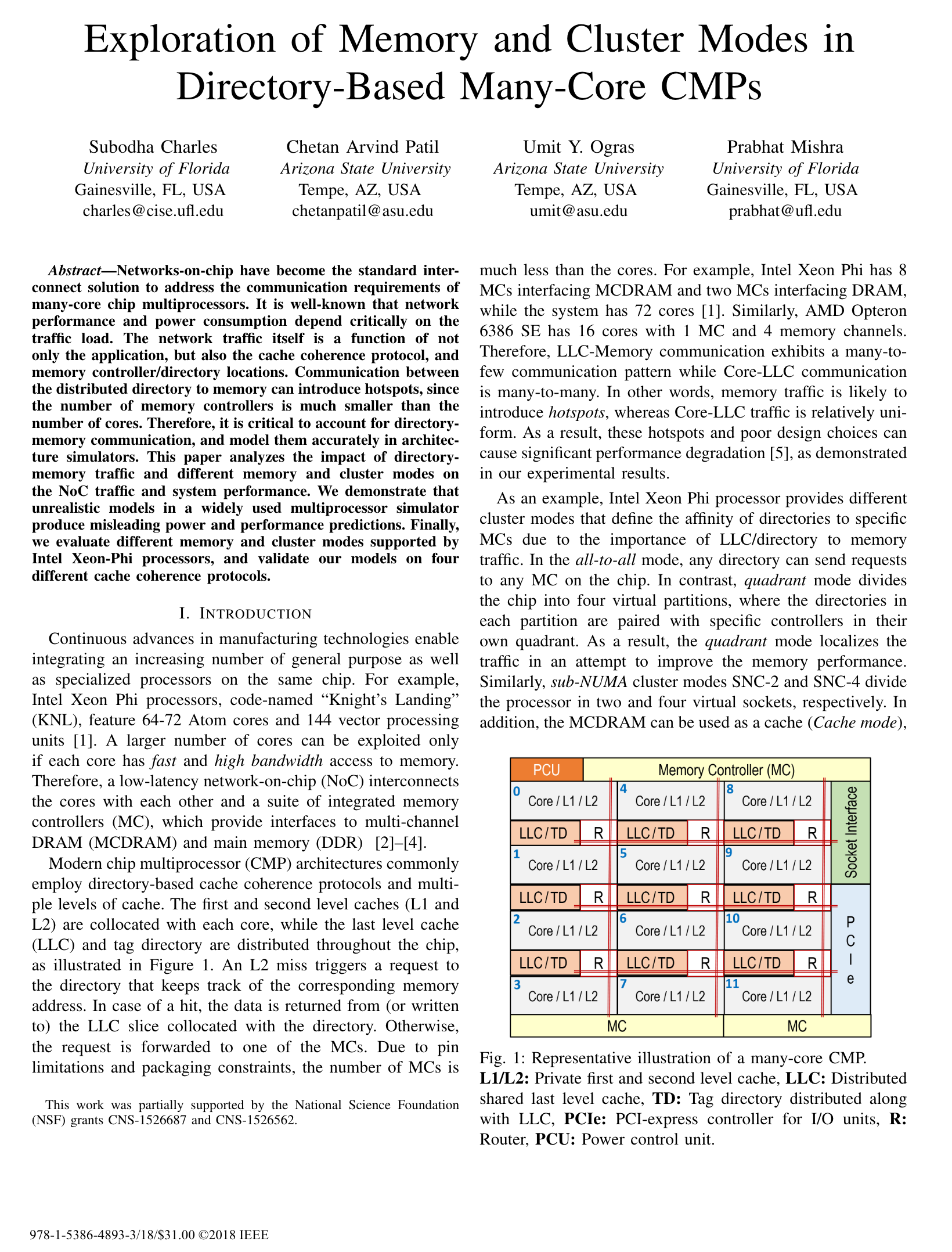
    Networks-on-chip have become the standard interconnect solution to address the communication requirements of many-core chip multiprocessors. It is well-known that network performance and power consumption depend critically on the traffic load. The network traffic itself is a function of not only the application, but also the cache coherence protocol, and memory controller/directory locations. Communication between the distributed directory to memory can introduce hotspots, since the number of memory controllers is much smaller than the number of cores. Therefore, it is critical to account for directory memory communication, and model them accurately in architecture simulators. This paper analyzes the impact of directory memory traffic and different memory and cluster modes on the NoC traffic and system performance. We demonstrate that unrealistic models in a widely used multiprocessor simulator produce misleading power and performance predictions. Finally, we evaluate different memory and cluster modes supported by Intel Xeon-Phi processors, and validate our models on four different cache coherence protocols.Subodha Charles,

  • Two Factor Authentication – Hardware vs Software

    Two Factor Authentication – Hardware vs Software

    Photo by NeONBRAND on Unsplash

    Two factor authentication (2FA) is a type of multi-factor authentication that allows users to secure any type of account using a second authentication apart from the regular password protection. 2FA has been around for a long time and received mixed reaction from security researchers.

    With growing number of internet and smart device users it is becoming increasingly important to take 2FA seriously. Let’s take a quick look at types of 2FA, which I have separated into hardware and software depending on where the second authentication code comes from.

    Software 2FA:

    • Software 2FA (S2FA) is straightforward. Any website which supports S2FA will first walk user through account creation which requires password (first authentication). Then it will provide three options:
      • First: Register cell number in order to receive unique code via SMS or a phone call whenever a login attempt is made. Only after entering this unique code user can access the account.
      • Second: Application will ask user to install smartphone app like Duo Security or Google Authenticator. Using the app scan the QR code shown on screen and this will register account with the app. On every login attempt this app will generate an unique code that needs to be entered after password authentication. This works even without internet connection.
      • Third: Skip both the options and have only single authentication mode i.e. password.
    • If the user has S2FA and doesn’t have cell network or smartphone with him/her during login attempt, then backup codes can be used.
    • These codes can be generated using account settings. Each backup up code expires as soon as it is used. For best practice, always generate and save new ones as soon as first one is used.
    • Below video explains above scenario:

    • Pros of S2FA:
      • Protects account from hackers.
      • Allows users to trust the website or application providing such service.
    • Cons of S2FA:
      • I personally think S2FA is very complex process for people who aren’t good with computers.
      • For Android devices SMS based 2FA (the easiest to setup for anyone irrespective of age or fluency in using smart devices) is most vulnerable due to the Android feature that lets any application read SMS stored in the messaging app. Thus allowing hackers a backdoor to these SMS codes.
      • Most likely this is the reason why banks don’t trust this option.

    Hardware 2FA:

    • Hardware 2FA (H2FA) is very similar to S2FA, however the 2FA is generated using a hardware rather than a software.
    • There different ways to setup H2FA:
      • First: Many laptops for long have provided finger print reader option. If fingerprint reader is available, then for the account with this feature user can register biometric to login as 2FA. This isn’t widely used for online websites, but mostly for logging into hardware devices like smartphone or PCs.
      • Second: From laptops to smartphones we have high resolution cameras. Many companies provide APIs that developers can use to access cameras as 2FA. For Apple devices there is Face ID. Microsoft provides Windows Hello. Face recognition for Android is under development. This option uses face as 2FA with help of camera.
      • Third: Security key is a piece of hardware that has electronic chip which has unique code inbuilt. Any application that supports 2FA using a security key will look for the registered key. If the key is found in USB port or via Bluetooth connection, then user will be allowed to access the application. Google strongly supports this option for enterprise based on their in house research.
    • If H2FA is setup and user doesn’t have access to 2FA devices, there is an option to use S2FA. Application for sure will force user to setup S2FA as a backup during H2FA setup.

    • Pros of H2FA:
      • Must more robust than S2FA.
      • Difficult to fish user as the hardware device has to be nearby.
    • Cons of H2FA:
      • Costly for regular user.
      • Many dislike carrying another hardware even though it can act as key chain.

    Future of 2FA:

    • I am in strong favor of H2FA. Instead of having to carry another piece of hardware, I would prefer if these keys can somehow find place in motherboard. This way applications can access and register keys using APIs. I understand this will not allow portability, but this idea can be improved.
    • Face ID is really good along with Windows Hello. With Google gearing up to bring face recognition to Android, it is fair to say that this is going to be the de-facto in near future when it comes to S2FA.
  • Online Identity

    Online Identity

    Photo by Elijah O’Donell on Unsplash

    World population has reached 7.5 billion. In 2017 about 3.5 billion users were active on internet, that is approximately 50% of world population. If internet was a country, it will be twice the size of the most populated country in the world. Anyone who is on internet can literally find any details about anything at click of a button.

    I think this simple statistic should be good enough for anyone who has anything positive to share to come online, write something and share with potentially 3.5 billion customers. The reason for this blog is to share simple steps on how to get online identity with the hope that it can help someone looking to get one.

    What Is An Online Identity?

    Online identity as per my definition is go to place on internet which users can visit and find more about what a particular individual has to offer. For example – this website is where I would expect people to come and then go onto other platform based on where they would like website feed to be seen. If one is really good at taking pictures, go ahead and sign up with Unsplash or Flickr. For academia there is Google Scholar or Mendeley.

    People like Troy Hunt take it to next level by making living out of it. It’s not always essential to have a dedicated website, one can take specific platform like LinkedIn or Quora and master it to a level that he/she gets awarded in form of LinkedIn Influencer or Quora Top Writer. This not only helps build profile but in process allows building of network.

    Are There Any Specific Steps To Get Online Identity?

    No. However, I suggest a process in following order:

    • Domain:
      • Grab a good domain name. If you can combine your first and last name and get a .com, then take it without thinking twice. Otherwise you can choose from TLDs specific to your country.
    • Website:
      • There are tons of DYI website builder but always consider that if you stuck with writing in form of blogs or articles, then it will grow and one day you will have to move to a dedicated hosting service.
      • Hence, I suggest signup with WordPress as it will be super easy to port it to different service if required. I have my own server but that’s not something everyone needs.
    • Analytics:
      • Though many DYI and WordPress will provide inbuilt traffic analytics. I would strongly suggest to setup Google Analytics and link it to your website. This way you can analyze and improve content based on internet traffic.
      • Even social media profiles like Twitter, Facebook, LinkedIn and Google Plus provide free traffic details at no cost. You just need to find how to enable it.
      • There are also tons of third party services that can track and analyze how your social profiles are performing and the ROI.
    • Social Media:
      • This goes without saying. After you have a website and all is set as per your liking, you need to get at least following must have social profiles.
      • Make sure your <social-website>/username is such that it matches up with your name for easy no brainer search engine optimization.
      • Must Have:
        • Reddit
        • Twitter
        • LinkedIn
        • Facebook
        • Google Plus
        • StackExchange
      • For Artist:
        • Vimeo
        • YouTube
        • Pinterest
        • Unspalsh
        • Instagram
        • SoundCloud
      • For Writers:
        • Quora
        • Medium
        • GoodReads
      • For Researchers:
        • PLOS
        • Scopus
        • ORCID
        • Mendeley
        • GrowKudos
        • ResearcherID
        • ResearchGate
        • Academia.edu

    First three steps to online identity depends on whether or not you need dedicated website to share. But I think social profiles are must and very easy to get.

    What If I Don’t Have Any Online Identity?

    Nothing. You will move on, world will move on. Online identity are smart moves for professionals who rely heavily on skills like software, hardware, paintings, writing, dancing, research, journalism and any type of work that demands work portfolio. Without saying it is must for businesses from any domain.

    It takes really long time to get your profile noticeable to even fraction of active internet users. So it is very important to decide early whether or not you want to get on to the journey of online identity.

  • Encryption Everywhere

    Encryption Everywhere

    Photo by Markus Spiske on Unsplash

    Since the time Edward Snowden leaked classified information, the focus has been on how governments across the world use surveillance to keep tap on digital activities. Lately, I have been reading about it and have come to the conclusion that there is no way around it. However, precautions can be taken if one is worried about his/her digital privacy.

    Encryption in software/hardware largely boils down to the developers and if they wish then they can strongly encrypt the communication/data. For example, WhatsApp has partnered with Open Whisper Systems to provide end-to-end encryption. The reason to trust this partnership is because Signal Protocol, the technology which WhatsApp uses to encrypt messages, is open. Thus allowing anyone to go through the code to understand what exactly has been implemented and whether that matches up to the expectation of tech community at large.

    On the other hand, if you see encryption tool like BitLocker provided by Microsoft to premium versions of Windows is not open sourced. That makes it hard to rely on it when encrypting laptop or desktop running Windows. Ubuntu does somewhat better job at this but Apple again has close system FileVault. All these systems lead to trust issues.

    If you are really worried about digital privacy and want to make sure that the system you are using is secured, then following suggestion may help:

    • Websites:
      • Make sure the website you visit has a valid SSL.
      • It is very simple to check, just look for the green/grey icon on left of the website domain on address bar after the page has been loaded. If it’s green or has lock icon, you are good to go.
      • In case the SSL certificate isn’t valid, then it will show warning message even before the page loads. For such website, visitor should either opt out of the it or try avoiding data transfer task like creating account, submitting private information etc.
    • Applications: 
    • Hardware:
      • Always encrypt your smart devices at operating system level.
      • Opt for laptop and desktop with Trusted Platform Module (TPM).
      • Any hard drive that is not encrypted can lead to data theft.

    Above steps can help encrypt 99% of your daily online activity. In today’s world using smart devices also mean being a smart tech user.

    Pro Tip: Troy Hunt has created short and easy to understand video series on internet security. You may want to watch it.

  • Time We Have Delete Button On All Websites

    Time We Have Delete Button On All Websites

    Photo by Devin Avery on Unsplash

    Since last one month, I started logging the websites I visit and use, mostly those which require user to login. To my surprise I have account at over 50+ different websites. The number may be much more, considering I wasn’t able to recall all those websites where I created account just because that was the only way to get in, and later on never used it. This may be the case with many internet users.

    What Is The Problem?

    Well, the problem is that 90% of these 50+ websites I visit don’t have SSL and some of these send plain text password reset or email the password itself. Showcasing there inner genius in handling user sensitive data. I have taken care not to repeat the mistake of using dump passwords, but that doesn’t help much, as intruders can get in and hit these websites hard. Many of these don’t care much about encryption, mostly because they don’t have expertise in it or may be it cost a lot to hire someone to do it. There should be a way to handle the user sensitive data on websites that don’t spend much effort in doing their bit.

    What Is The Solution?

    The first solution I see is to delete the account, but the problem here is many of the websites I/we log into don’t have the option of “delete/wipe”. If you stretch a lot, websites may provide you with deactivation of account which again doesn’t help. Ultimately you end up being tied with a particular website which you may never use again and the worse happens when someone hacks them.  If you are wondering why will any one care about websites that most likely doesn’t get much visitors then you are wrong. Such websites are much more vulnerable as they can be easy targets and when you extend such intrusion to many other similar websites you get a very large pool of user data. So, please give me that delete button.

    The second solution is to make use of Auth APIs. Google, Facebook are the two most popular and widely used websites. Let them take care of logging in and out of the accounts. If a user removes app authentication for logins, it will also remove/wipe the data automatically. This way you don’t get into the hassle of managing the user account creation and maintenance activities. May be you tap into the social sphere by using such Auth APIs. This isn’t a straightforward solution, but doable.

    The third solution would be to imbibe encryption by default, both on the client and server side. I am not sure if this is the case in today’s databases and other back end tools. But if software has a functionality that by default embeds encryption, then at least 99% of the user data is safe. Getting SSL is costly, and not many opt for that, but if open source projects like WordPress can find a way to develop websites with encryption embedded everywhere, I think that should help. I think Let’s Encrypt is a good start.

    The fourth solution is the simplest just don’t open account if you aren’t able to establish trust on a particular website. Look for SSL and if you are an experienced internet user you will get a hint whether to create account with the website or not. Also, limit the urge to use every website you get hold of.

    Pro Tip: If you want to keep track of all data breaches them do follow Troy Hunt and subscribe to Have I Been Pwned.

  • The Curious Case of Indian Cyber Security

    The Curious Case of Indian Cyber Security

    Photo by Matthew Henry on Unsplash

    India is home to billion dollar IT industry, numerous e-Governance projects, world’s largest bio metric database and many tech driven services. The single major problem with all these technological projects at national and state levels is the danger of theft and fraud. Government of India (GoI) did realize this and as they do with all services, introduced a policy called National Cyber Security Policy 2013.

    Well, the story ends with the formation of policy, 2 years after the policy was drafted there is no sign of National Cyber Coordination Centre (NCCC), and National Critical Information Infrastructure Protection Centre (NCIIPC). Both these agencies were supposed to take care of national IT infrastructure, mainly falling under GoI.

    What’s The Problem?

    Currently, as per my understanding there is only one national level cyber alert team called Indian Computer Emergency Response Team (CERT-In). They are mainly responsible for capturing and distributing information related to cyber security threats and they have been doing an excellent job. The major problem with CERT-In is that they are depended on CERT teams of advanced countries. What they need is a better way to tackle cyber security threats, which may put public and private IT infrastructure at risk. For this reason, GoI came up with new cyber security policy.

    Under the new policy, NCCC and NCIIPC will be formed as separate agencies, meaning they won’t be attached to CERT-In. When it comes to forming a separate national agencies in India, it takes really long to get hold of things and similar issues seems to have happened with these two new agencies. And, the more time it takes to put these agencies to work, the riskier our national IT infrastructure becomes. With cyber surveillance at its peak, national documents being leaked all over world and millions of Indians coming online, it has become the basic need to have these two agencies in place to tackle any cyber threat situation. The next war won’t be fought between forces, but between cyber war teams.

    What’s The Solution?

    The best case is to have these two agencies under or with CERT. This way CERT itself will get a major infrastructure upgrade and having years of experience would also come handy. With new agencies doing similar task and setting up new teams with new tech skills, it becomes a long and tedious process.

    GoI still has time to get this done other way, considering that there will be no conflict of interest. Also, with Digital India, and many other technological projects like Aadhaar taking shape, GoI should implement the policy as soon as possible, before they get tangled in cyber warfare.